APT or Advanced Package Tool is an software package used to install, update and remove packages on Debian based systems. It is the default package manager on Ubuntu and Debian based systems. The apt, apt-get and apt-cache are quickly used commands to manage packages and configuration on system.
Apt don’t provide any command to list available package under the specific repository. But you can find the list from a cache file, which contains list of available package to that repository with other details.
This tutorial will help you to find all the available packages in a repository on Ubuntu and other Debian based systems.
Apt keeps all repository cache files under /var/lib/apt/lists directory. So, first update the apt cache on your system
sudo apt-get update
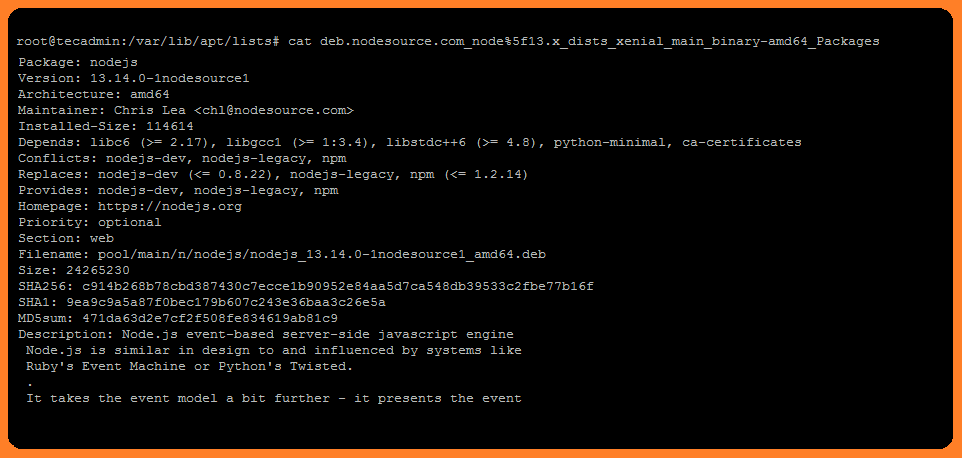
Now, navigate to /var/lib/apt/lists directory. Then search for the file with the repository name, path and architecture, ends with _Packages in there name.
See the content of *_Packages to view details about all packages available under that repository.
To list the packages only available in file, execute below like:
grep -h -P -o "^Package: K.*" /var/lib/apt/lists/ppa.launchpad.net_*_Packages | sort -u
In this article, you have learned to find all the available packages in a specific repository.
The post How to List All Packages Available in a Repository on Ubuntu appeared first on TecAdmin.
Lo and behold 👐, Ubuntu MATE 26.10 (Stonking Stingray) is here! 🎊 We are back…
This article provides a guide demonstrating how to deploy Kiwix Server on Ubuntu VPS. What…
A few months ago, we introduced Myna, our project to bring private, local speech-to-text dictation…
Ubuntu 26.10 “Stonking Stingray” arrives at a time when AI tools are accelerating vulnerability discovery.…
One of the best things about Rust is how easy it is to get started.…