I recently installed Ubuntu on my desktop computer. Everything was working fine, except that I was not able to capture screenshots using the ‘Insert/Print Screen’ key on my Dell keyboard. While googling the issue, I stumbled upon a workaround that solved my problem.
The workaround was to create a custom keyboard shortcut. If you are also facing a similar screenshot-related problem, or want to know in general how to create custom keyboard shortcuts in Ubuntu, you’ll be glad to know that’s what we’ll be discussing here.
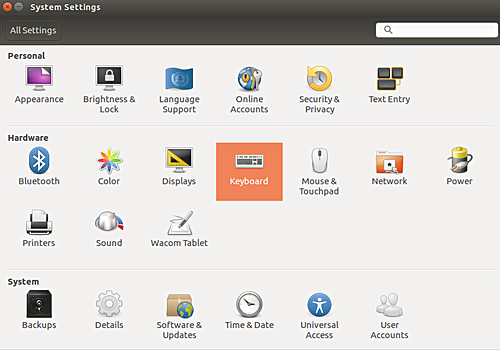
For this, first head to the System Settings menu, and then click the Keyboard icon there.
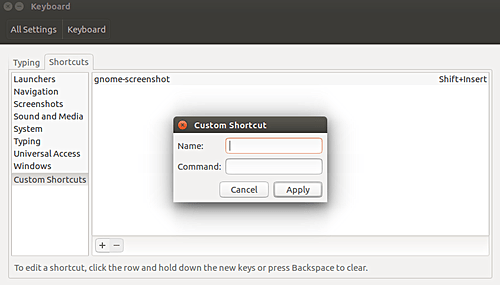
In the window that appears, open the Shortcuts tab.
Here, click the Custom Shortcuts option at the bottom left, followed by a click on the ‘+’ icon at the bottom. You’ll see that a small window will appear where you can provide the shortcut details.
Fill in the shortcut name, and the command you want this shortcut to execute. For example, I entered the following details:
Click the ‘Apply’ button, and the shortcut will be created. But it will be disabled by default.
To enable it, click over the Disabled text, and then press a key combination of your choice (this key-combination will trigger the command that this shortcut corresponds to). For example, I pressed Alt+Insert.
Once done, your custom shortcut is ready. You can use it for whatever purpose it is intended for.
The post How to create custom keyboard shortcut in Ubuntu Linux appeared first on FAQforge.
This article provides a guide for How to Setup Video Streaming with Icecast on AzuraCast…
When your organization first signed its Microsoft Azure Consumption Commitment (MACC), it was a strategic…
[December 11, 2025] Today Canonical, the publisher of Ubuntu, announced the immediate availability of Java…
Setting up a local Deep Learning environment can be a headache. Between managing CUDA drivers,…
Telecommunications networks are undergoing a cloud-native revolution. 5G promises ultra-fast connectivity and real-time services, but…
In software engineering, we often talk about the “iron triangle” of constraints: time, resources, and…