Ubuntu’s Unity graphical shell is pretty good when it comes to customization. Just think of a change, and you’ll find that it can be done – for what it’s worth, you can also move the Unity Launcher from side to bottom starting Ubuntu 16.04.
However, there are certain things that are difficult to achieve in Unity. One of them is to change the size of icons on top bar (or system tray). There’s currently no direct way to do this. Yes, you guessed it right, indirect ways are there. But they aren’t neat.
However, if you want to change the size of top bar icons at any cost, I’ll share one such indirect way here. Please note that the steps mentioned here have been tested on Ubuntu 16.04 LTS.
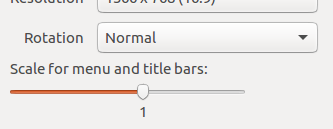
First, head to System Settings -> Displays. In the window that opens, look for the option Scale for menu and title bars. On my system, the default value for this option was set to 1.
And here’s the default size of system tray icons on my machine:
Now, if you want to increase the size of icons, just drag the bar forward. Similarly, to make them smaller, drag the bar backwards. For example, for me, dragging the bar forward to its full value increased the size of icons in the following way:
Before you think that’s neat, it’s worth mentioning that the trick increased over all UI size/resolution. So the call is yours, if you wanna go this route.
The post How to change size of system tray icons in Ubuntu appeared first on FAQforge.
Lo and behold 👐, Ubuntu MATE 26.10 (Stonking Stingray) is here! 🎊 We are back…
This article provides a guide demonstrating how to deploy Kiwix Server on Ubuntu VPS. What…
A few months ago, we introduced Myna, our project to bring private, local speech-to-text dictation…
Ubuntu 26.10 “Stonking Stingray” arrives at a time when AI tools are accelerating vulnerability discovery.…
One of the best things about Rust is how easy it is to get started.…